
Bring KellyIQ Portfolio Sizing Into Your Workflow
Connect your existing models and tools to KellyIQ through Python, the REST API, Claude and other MCP clients, and Excel. Send the bets and your view of each, set your limits, and get a stake for every bet back, sized across the slate as one portfolio.
KellyIQ's slate sizing engine now works outside the web app. You can call it from a Python model, from your own application over the REST API, from Claude or another MCP client, or from an Excel workbook, and get the same thing back each way: a stake for every bet, sized across the whole slate as one portfolio, inside a per-bet limit and a total limit that are both hard caps.
None of this changes how you find your bets. If you build betting models, you're already producing estimated win probabilities. KellyIQ handles what comes next: allocating your bankroll across the slate. That step is usually a few lines of sizing code at the end of the notebook (Kelly on each bet, a cap, maybe a rescale when the total gets too big), and KellyIQ can take its place wherever the rest of your process lives.
Your model finds the edge. KellyIQ allocates the bankroll.
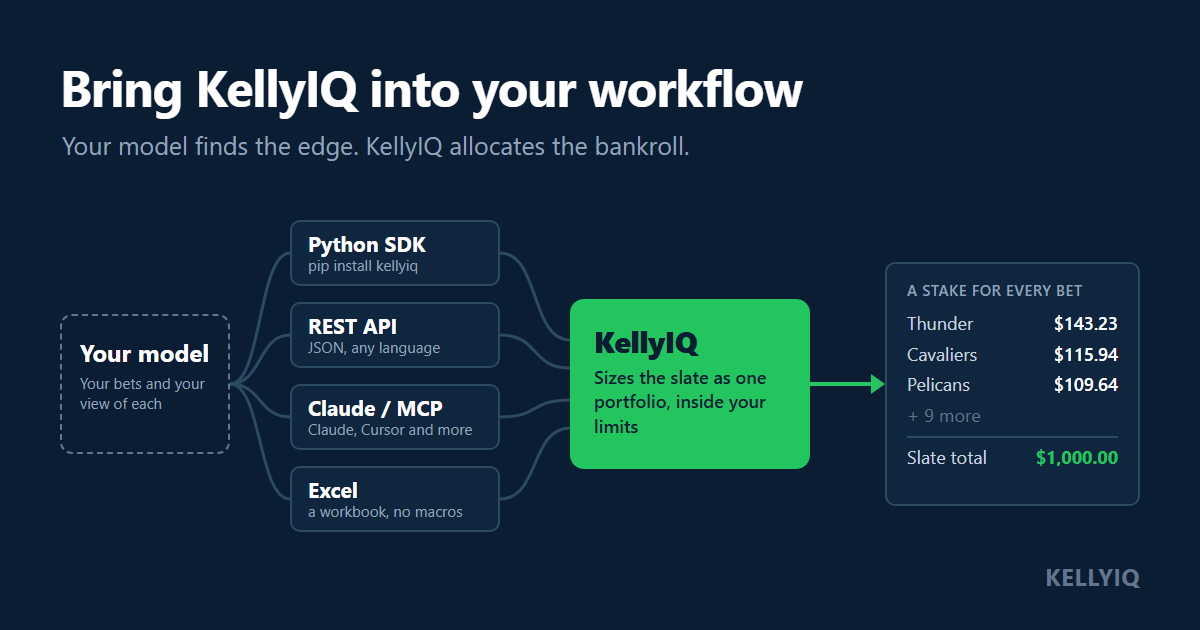
Choose your integration
All four provide access to KellyIQ's portfolio sizing engine, with inputs and controls suited to each workflow.
| Integration | For | You send | Docs |
|---|---|---|---|
| Python SDK | Model builders working in notebooks and scripts | Probabilities or confidence levels, as dicts built from a DataFrame, a CSV or anything else | Python |
| REST API | Developers building their own tools or apps | JSON from any language | Quickstart |
| Claude and MCP clients | Anyone who'd rather describe the slate in plain English, or work from an AI coding tool | The slate, in conversation | Claude and MCP |
| Excel | Bettors who keep the slate in a spreadsheet | Confidence levels, one row per bet | Excel |
The Python SDK is a thin client over the REST API, so the two return the same response. Claude connects by signing in to your KellyIQ account and sends the slate for sizing instead of doing the Kelly math itself. Claude Code, Cursor, VS Code with Copilot and Gemini CLI connect to the same MCP server with your API key. The Excel workbook runs on Windows Excel with no macros, and takes confidence levels rather than probabilities.
Example: integrating KellyIQ with a Python model
Before you run this: sending your own probabilities needs the Bettor plan or above. Every new account starts with a 14-day Bettor trial, so the example works during the trial. The Free plan sizes from confidence levels instead.
The complete, runnable version of this example is in the kellyiq-examples repo (size_from_model.py and model_output.csv), if you'd rather run it than copy it.
Say your model's output for a 12-game NBA night lands in a CSV. One row per bet: the side you like, both prices, and your model's probability for that side.
id,team,opponent,odds,opponent_odds,p
OKC,Oklahoma City Thunder,Toronto Raptors,-400,320,0.82
CLE,Cleveland Cavaliers,Orlando Magic,-160,135,0.64
MIN,Minnesota Timberwolves,Dallas Mavericks,-120,100,0.57
HOU,Houston Rockets,Memphis Grizzlies,105,-125,0.51
SAS,San Antonio Spurs,LA Clippers,170,-205,0.40
CHI,Chicago Bulls,New York Knicks,240,-295,0.32
BKN,Brooklyn Nets,Boston Celtics,550,-800,0.17
ATL,Atlanta Hawks,Detroit Pistons,-115,-105,0.55
POR,Portland Trail Blazers,Denver Nuggets,400,-520,0.22
PHI,Philadelphia 76ers,Miami Heat,-140,118,0.60
GSW,Golden State Warriors,Sacramento Kings,-110,-110,0.545
NOP,New Orleans Pelicans,Phoenix Suns,130,-155,0.465
Install the package and set your API key (create one in the app under Settings → API):
pip install kellyiq
export KELLYIQ_API_KEY=kiqa_...
On Windows PowerShell, set the key with $env:KELLYIQ_API_KEY = "kiqa_..." instead.
Then size the slate. This uses a $10,000 bankroll at quarter Kelly, with no more than 2% of the bankroll on any one bet and no more than 10% staked across the slate:
import pandas as pd
from kellyiq import KellyIQ

slate = pd.read_csv("model_output.csv", dtype={"id": str})  # ids come back as strings

client = KellyIQ()  # reads KELLYIQ_API_KEY
result = client.optimize({
    "bankroll": 10_000,
    "kellyFraction": 0.25,     # quarter Kelly
    "perBetCap": 0.02,         # at most 2% of the bankroll on one bet
    "maxTotalExposure": 0.10,  # at most 10% staked across the slate
    "picks": [
        {
            "id": r.id,
            "sport": "basketball_nba",
            "team": r.team,
            "opponent": r.opponent,
            "odds": int(r.odds),
            "opponentOdds": int(r.opponent_odds),
            "probability": float(r.p),
        }
        for r in slate.itertuples()
    ],
})

stakes = pd.DataFrame(result["allocation"]["stakes"])[["id", "stake"]]
slate = slate.merge(stakes, on="id", how="left").fillna({"stake": 0})
print(slate[["team", "odds", "p", "stake"]])
print(f"Total staked: ${slate['stake'].sum():,.2f}")
The id is yours. Use whatever key your pipeline already has, a game id or a row number, and the stakes come back under it. Here is what that slate returned:
| Team | Odds | Model probability | Stake |
|---|---|---|---|
| Oklahoma City Thunder | -400 | 82% | $143.23 |
| Cleveland Cavaliers | -160 | 64% | $115.94 |
| Minnesota Timberwolves | -120 | 57% | $100.80 |
| Houston Rockets | +105 | 51% | $80.26 |
| San Antonio Spurs | +170 | 40% | $97.47 |
| Chicago Bulls | +240 | 32% | $75.75 |
| Brooklyn Nets | +550 | 17% | $39.09 |
| Atlanta Hawks | -115 | 55% | $47.61 |
| Portland Trail Blazers | +400 | 22% | $51.41 |
| Philadelphia 76ers | -140 | 60% | $59.50 |
| Golden State Warriors | -110 | 54.5% | $79.30 |
| New Orleans Pelicans | +130 | 46.5% | $109.64 |
| Total | $1,000.00 |
The total lands exactly on the 10% limit, and no bet reaches the $200 per-bet limit. On this slate the total is the limit doing the work.
A bet can also come back at $0. That isn't an error: it's left out of allocation.stakes (the merge above fills it with 0), and the response gives the reason in result["picks"][i]["reason"]. BUDGET means the slate limit was better spent on the other bets.
What KellyIQ handles
Whichever way you connect, the engine does the same work:
- Fractional Kelly as an input. Send a Kelly fraction and the whole allocation is sized at that fraction of full Kelly.
- The slate as one portfolio. Every bet is sized against the same bankroll at the same time, so adding a bet can change the allocation.
- Hard limits. Both limits are constraints in the sizing itself, not a trim afterward, and the stakes are held to them after rounding to the cent.
- Repeatable results. Send the same inputs with the seed a response returns, on the same
engineVersion, and you get the same result, to the cent (how). We sent this slate three times and got identical stakes on every bet.
The response also carries per-bet detail: the full, half and quarter Kelly stakes side by side, and the simulated range of outcomes for the slate. The optimize reference describes every field.
Why size the whole slate?
If your notebook already sizes bets, it probably does something like this: Kelly on each bet, cap each one, then scale everything down if the total is over your limit. That's a reasonable approach, and when the limits don't bind it gives nearly the same answer KellyIQ does.
When the total limit binds, it isn't the same problem anymore. Scaling every bet down by the same factor keeps the proportions that single-bet Kelly chose, but those proportions were worked out as if each bet had the bankroll to itself. Once the bets share a fixed budget, a different split of the same money can produce higher modeled expected log growth. KellyIQ sizes the bets jointly instead, maximizing an approximation of expected log growth subject to your limits.
We tested both on three NBA slates at quarter Kelly, 2% per bet and 10% total, scoring each allocation by its exact expected log growth. The scoring assumes the stated probabilities are accurate and the bets are independent:
| Slate | Bets | Cap, then scale | KellyIQ | Difference |
|---|---|---|---|---|
| A | 8 | 37.2 bps | 36.6 bps | 1.5% lower |
| B | 12 | 47.1 bps | 48.6 bps | 3.3% higher |
| C | 20 | 45.2 bps | 52.1 bps | 15.4% higher |
Expected log growth in basis points of bankroll per slate. Slate B is the example above.
On slate A the total limit doesn't bind: cap-then-scale stakes $848.69 and KellyIQ $841.53. At quarter Kelly, slightly larger stakes score slightly higher on log growth, and KellyIQ's objective approximates log growth rather than computing it exactly, so the simple method comes out slightly ahead. On B and C, where the total limit binds, sizing the slate jointly comes out ahead. How far ahead depends on the prices, the probabilities and the limits, not on how many bets are on the slate.
That's one test, on our slates, at one setting. The slates, the scoring script and every raw result are published with the methodology so you can rerun it against your own sizing.
Getting started
Have a model or a slate already? Start with the integration that fits your workflow:
- Python:
pip install kellyiq, Python 3.9 and up. Python guide - REST API: quickstart and reference
- Claude and MCP clients: connect Claude, Cursor and more
- Excel: the workbook and setup
Python, the REST API and Excel use an API key, which you create in the app under Settings → API. Claude connects by signing in instead, and coding assistants such as Claude Code and Cursor can use the key. Every plan includes API access with its own daily allowance. Your own probabilities need Bettor or above, and every new account starts with a 14-day Bettor trial, so you can size a slate from your own model's probabilities from day one. See pricing for allowances and slate sizes.
The kellyiq-examples repo has runnable versions of all of this, including the example above, recipes in Python and JavaScript, and the workbook.
KellyIQ doesn't pick bets, find edge or predict outcomes. It models bets as independent, so it doesn't adjust for two bets on the same game. The stakes are a calculation from your inputs, and they're only as good as your model's probabilities.
Frequently asked questions
KellyIQ is a modeling tool. It produces allocation outputs under user-defined assumptions and does not recommend, advise, or predict any wagering outcome. For entertainment; 21+, US only. If gambling is a problem, call 1-800-GAMBLER.
Get new posts by email
Occasional writeups on sizing, risk, and portfolio construction. No picks, no hype.
By submitting, you agree to our Privacy Policy. Unsubscribe at any time.